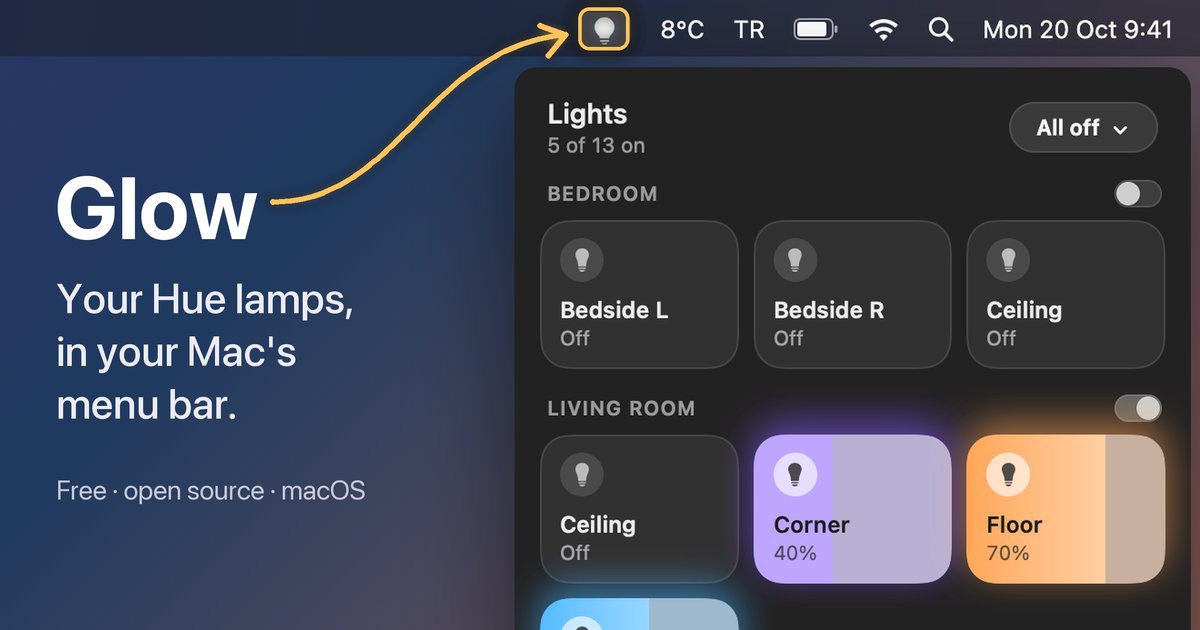
Glow is a small Mac app that puts my Philips Hue lamps in the menu bar. I click to switch a lamp, drag to dim it and right-click for colors, and that’s basically it.
It started with a simple annoyance. When I’m at my desk, turning off a lamp means picking up my phone and going through too many clicks in HomeKit, or asking Alexa and hoping she gets it right (which she often doesn’t). I just wanted to control my lights without having a conversation about it.
So on a boring Sunday evening in October 2026, I sat down and built it with Claude Code. Within a day it was running on my real Hue Bridge, and it was also public on GitHub, with a website and an installer.
Also, my Hue setup is a mess, with three or four rooms and way too many lamps, and to be honest I had zero interest in tidying it up in the Hue app. That’s why Glow lets you put rooms and lamps in your own order and hide the ones you never touch, without changing anything on the Hue side.
There’s also All off, which turns everything off right away or in 5 to 60 minutes. The timer runs on the bridge itself, so it works even when my Mac is asleep.
The funny part came after I shared it. Several people thought Glow was a phone app, because the link preview was basically a tall screenshot of the lamp grid. So the website now shows the whole menu bar, with an arrow pointing at the bulb.
Anyway, it’s a small thing, but now I switch my lamps without picking up my phone or talking to anyone. It’s free and open source, and next up is a card for my Nest thermostat, so I can see the temperature at home and adjust it without reaching for my phone.
Apparently I hate reaching for my phone when I’m on my computer.